Marketing Kit Report analyzes the effectiveness of each event
Systematically organizing relevant information to optimize future events has become a major pain point for marketers whenever performance analysis is needed after a lucky draw or member-get-member (MGM) event, whether it is analysis of the number of participants, status of the lucky draw, or number of new friends.
BotBonnie’s Kit Report supports three advanced Kit Report analyses, namely Lucky Draw, Scratch-off, and MGM Kit. After the event is held, marketers don’t need to spend a lot of energy sorting out all the data. All data is displayed directly on the backend. You can enter personal emails and export user lists to facilitate report closure.
View kit report
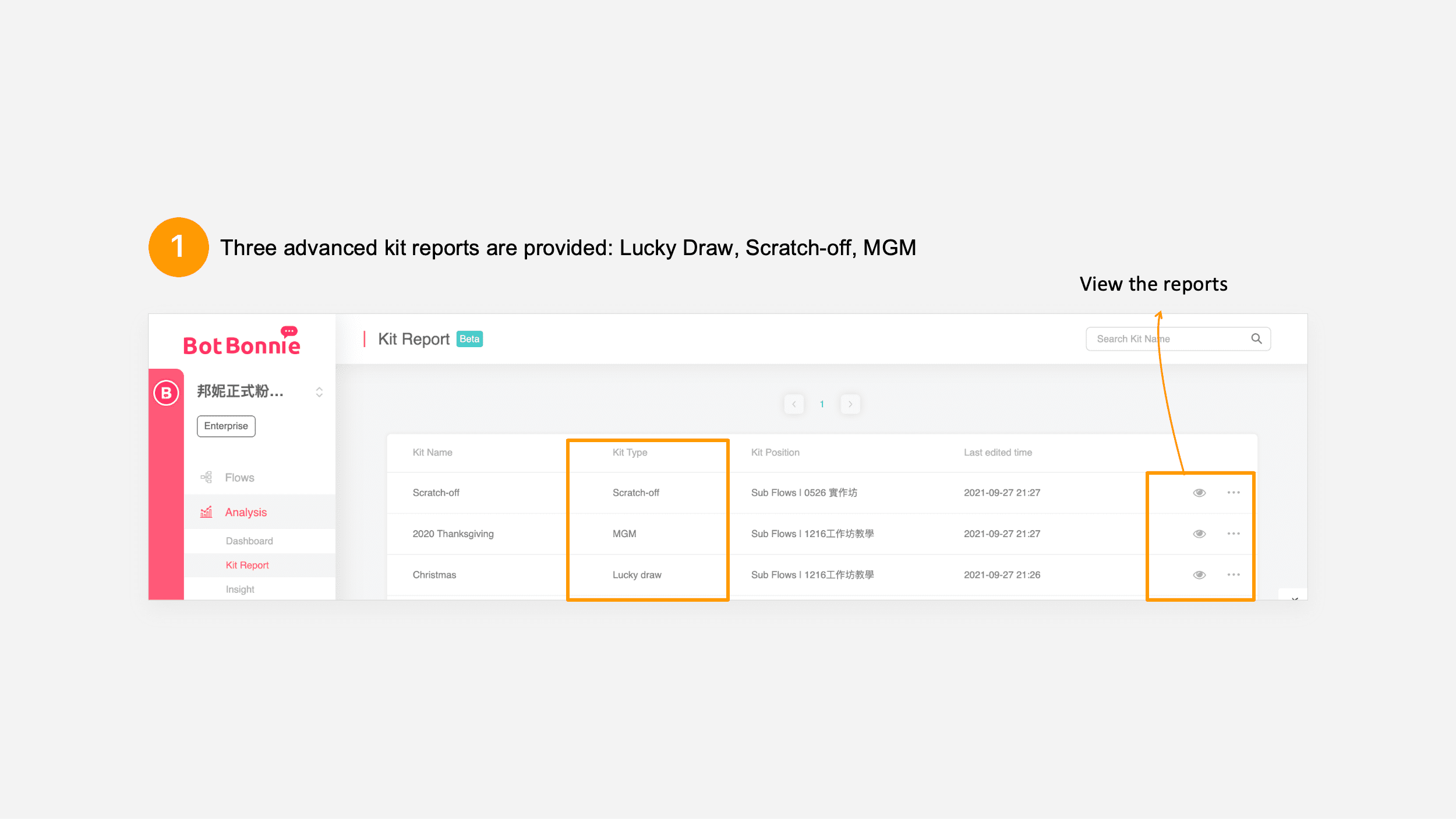
First, go to the “Analysis” field in the menu on the left side of the bot, where you will find the “Kit Report”; click it to enter the report tab. You will see all the Lucky Draw/Scratch-off/MGM Kit information you use. Just click the eye icon on the right of the kit you want to analyze to enter and view that kit’s report. At the same time, through the “three dots” icon, you can directly view the interactive analysis and flows content of the kit.

Next, we will introduce the Lucky Draw, Scratch-off, and MGM kit reports:
Lucky Draw and Scratch-off kit report
First, select the Lucky Draw/Scratch-off kit report you want to view and click the “eye icon” to view the event results of the Lucky Draw/Scratch-off kit, which will allow you to directly understand the current state of the lucky draw in one table. First, provide the name of the kit, the preset number of draws and the type of prize information, and provide a report summary of the drawing.
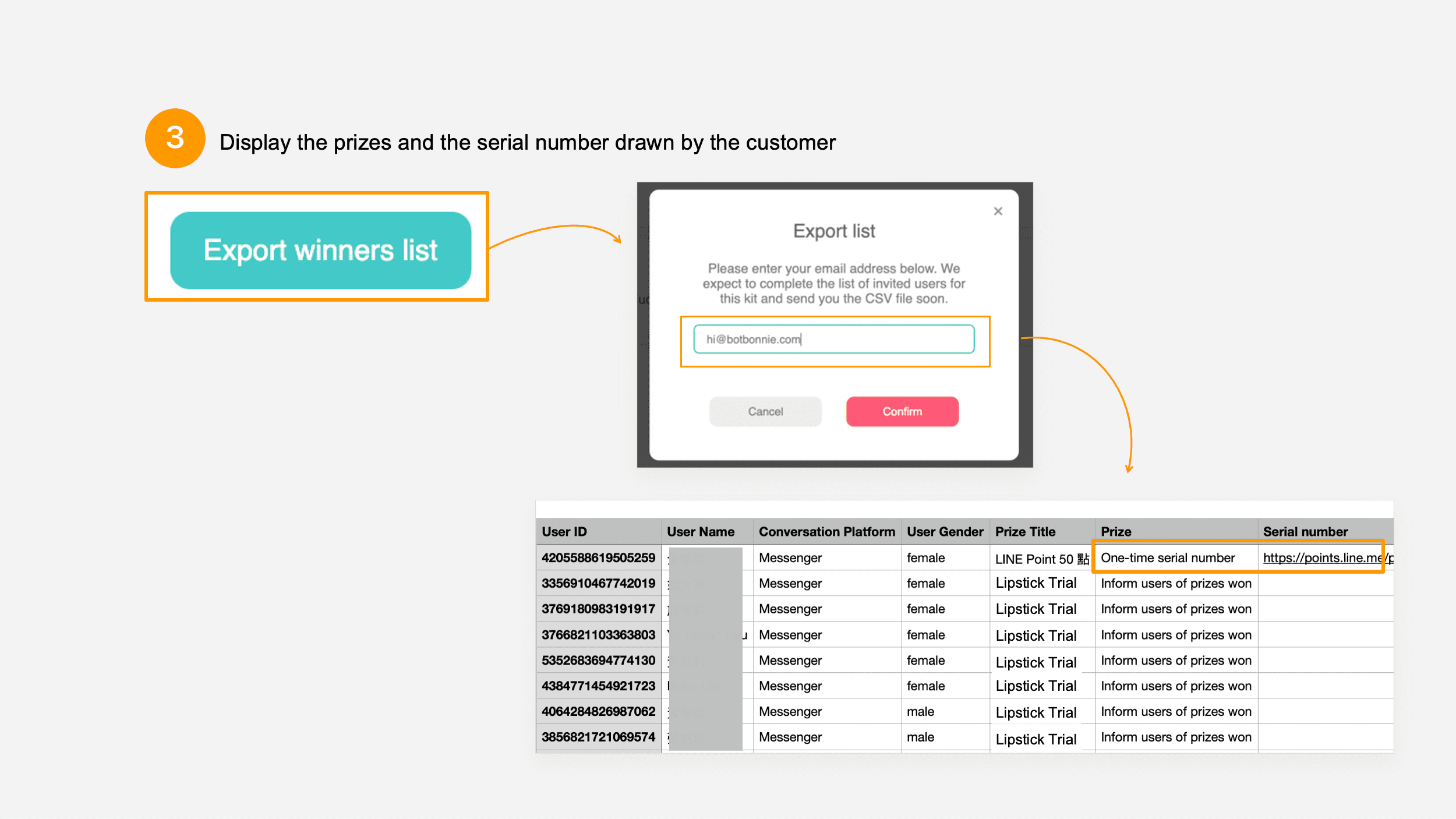
You can directly export the performance report by clicking “Export Winners List” in the upper right corner. After clicking it, the BotBonnie system will automatically send it to the email address you’ve entered. In addition to the inventory status, the lower part provides a performance report of the number of people who drew and the number of draws during the specified period.
👉 Make a Lucky Draw kit campaign in just 5 minutes

- Export Winners List
Just enter your email address, and the system will export the Winners Listwithin 1 hour. It will send the list to you in a CSV file so that you can conduct follow-up contacting and recording. BotBonnie Lucky Draw/Scratch-off kit will collect the following information from users: User ID, name, lucky draw platform, gender, prizes won, prize type, one-time serial number and Lucky Draw kit ID, drawing time, redemption time, and Facebook photo.
👉 Set up a Scratch-off game in just 7 minutes!
- Prize Status
You can view the Prize Titles, Remainder, Drawn Amount, And Probability of what was set for the kit. - Detailed data
Set the specified time interval in the date field on the upper right: Check performance of this section for Today, the Last 3 Days, the Last 7 Days, the Last 30 Days, the Last 3 Months, and the Event Period: Line graph of the number of people who have drawn per day, the number of draws per day, and the number of prizes won in each category.
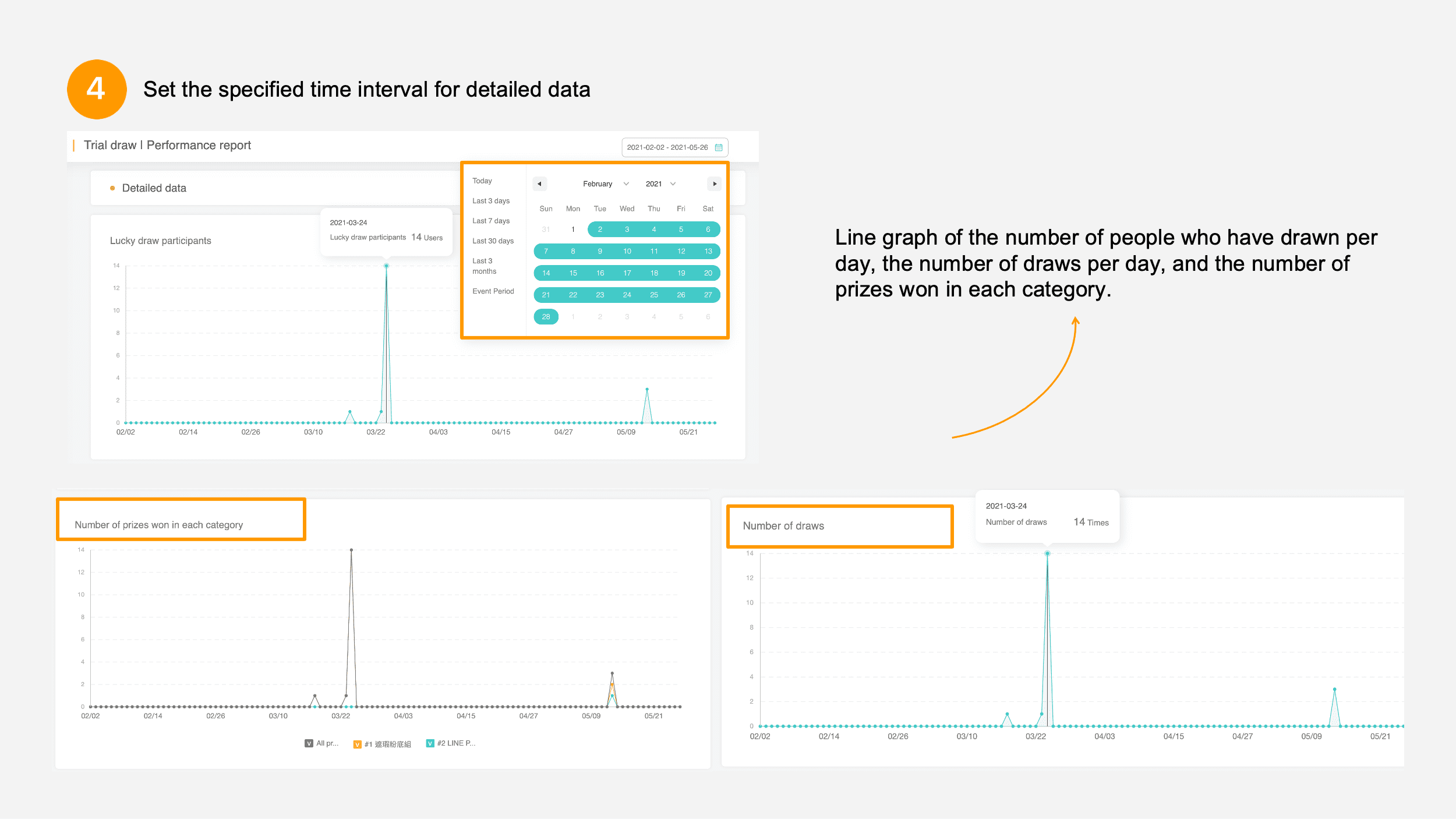
【BotBonnie’s Note】The kit reports for the Scratch-Off Kit and Lucky Draw Kit are presented in the same way, so the interface of the Lucky Draw Kit is representative of both.
MGM Kit Report
Different from the Lucky Draw kit, the MGM Kit Report allows you to view the users invited using this kit as well as the status and effectiveness of the invitation.
After entering the Kit Report, we can view in “Basic Information” the kit settings applied for this event, such as: Open Period, Channel of Invitation, standard Target, and Rankings.
🔥 We’ll teach you how to create an MGM activity in no time!
In addition, the “Report Summary” directly displays digitized performance results of each category, as follows:
- New fans: Among the successfully invited users, (this amount) is how many users have never opened a conversation with this page.
- Old fans reached: Among the successfully invited users, (this amount) is how many users have opened a conversation with this page.
- Total inviters: The user number of successfully invited friends and fan pages into a conversation, which is the number of users who used the kit to invite other users.
- Average number of invited friends: The average number of friends invited per user who successfully invites friends. For example, “Inviter a” successfully invited 3 people, and “Inviter b” successfully invited 2 people. So the average number of friends invited is 2.5.
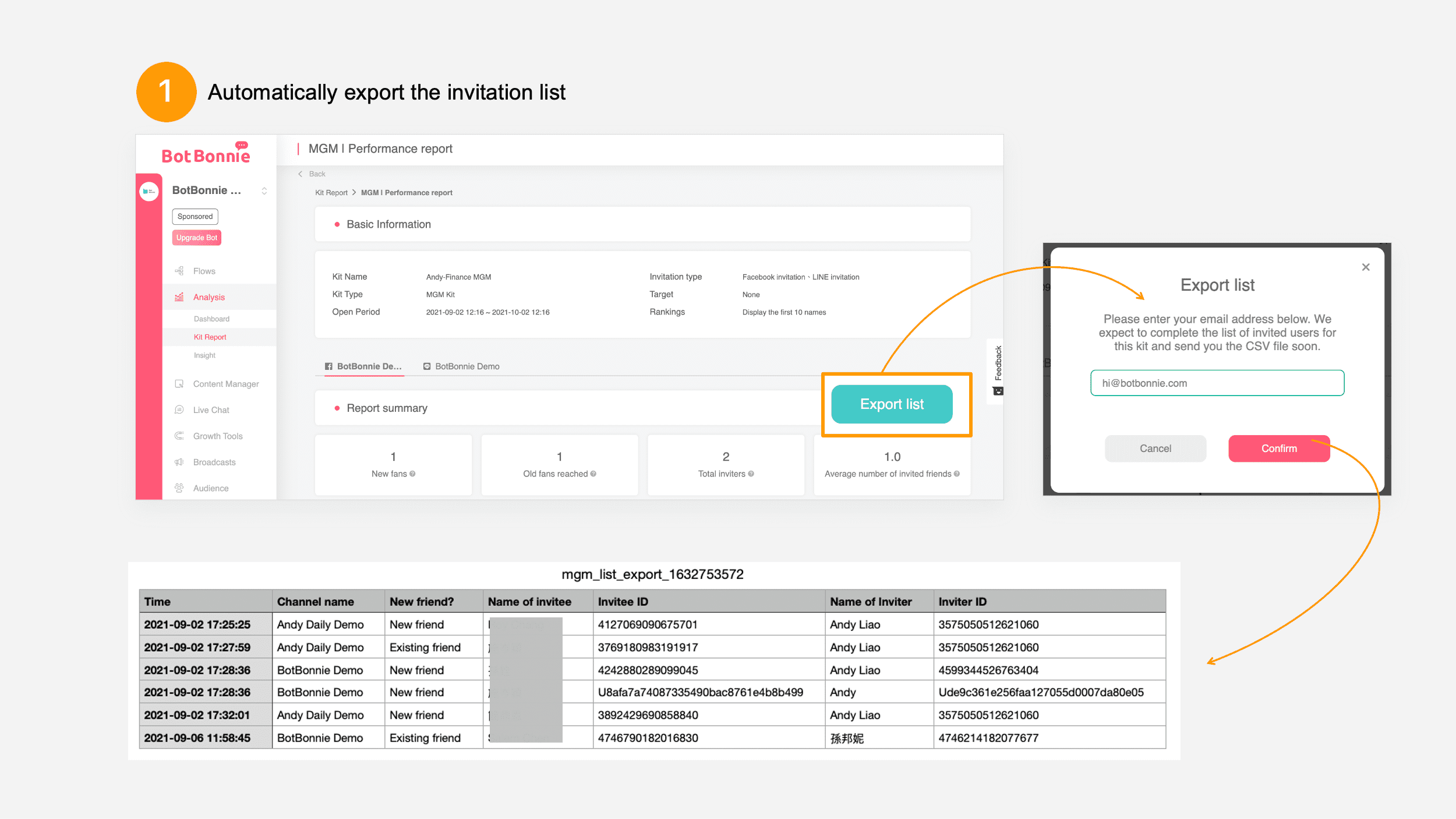
自Automatically export the invitation list so that you can make a performance report whenever you need to see the progress of the event. Just click “Export List” in the upper right corner and enter your email address in the “Report Summary” to receive a report of the number of successful invitations using the MGM kit. The data contains the following: Time of successful invitation, name of channel, whether it is a new fan, invitee name, invitee ID, inviter name, inviter ID.
- Detailed data
You can view data in two aspects: The method of invitation and whether it is a new friend allows you to quickly understand which channel is most effective for your event, how many new users have been reached by this event, and the usage rate of existing users.

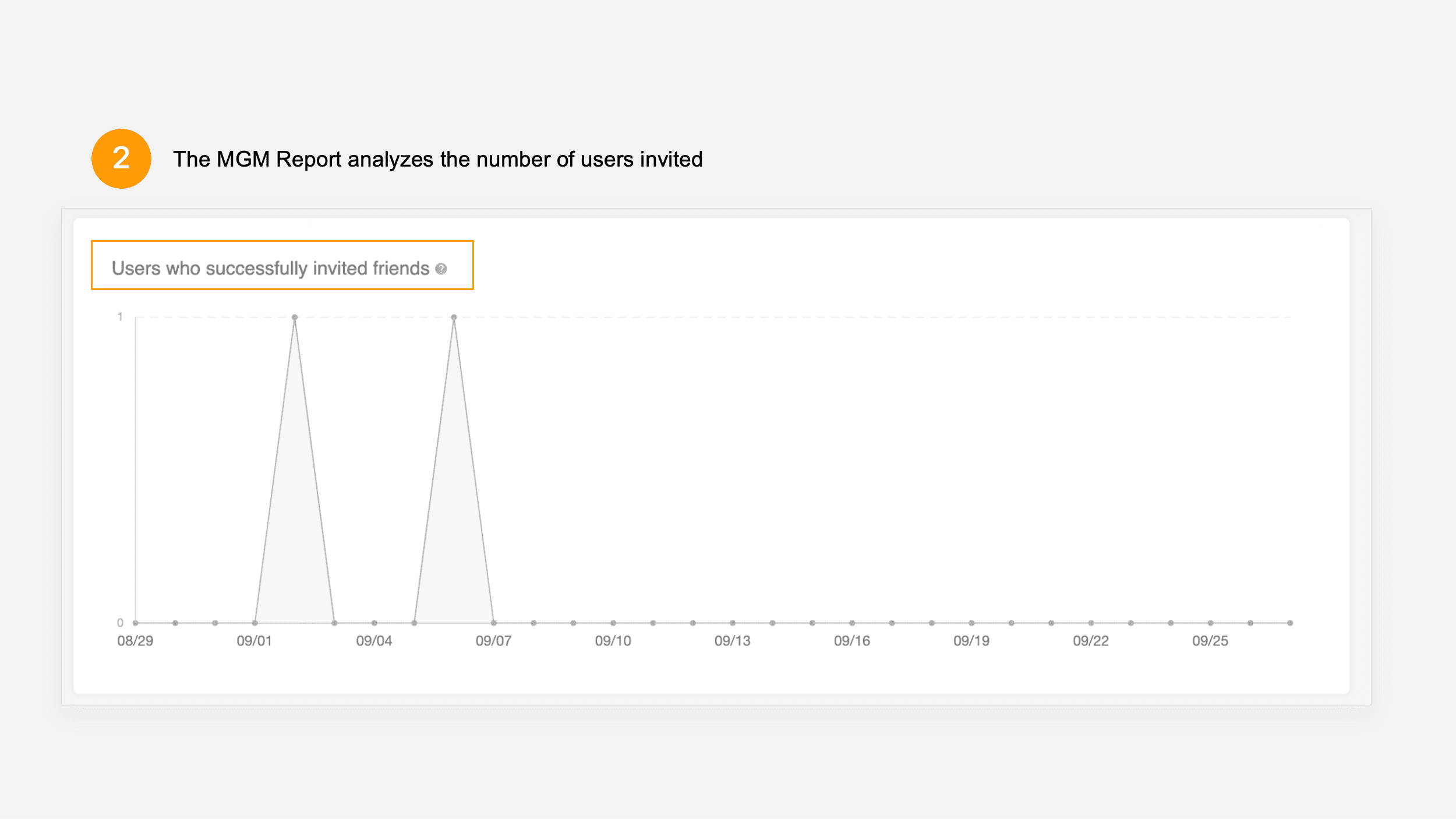
- Users who successfully invited friends
When a user sends an invitation to a friend that is successful, the exclusive invitation link can be clicked to start the conversation module. The user will then be defined as a “user who successfully invited friends.” Each day’s invitation performance can be viewed in the event interval.
However, understanding the difficulty of event design is a major indicator of optimization of subsequent events.
- Distribution of successful friend invitations
Check how many friends have been successfully invited by most users to facilitate optimization of the number of people meeting past targets.
If the number of successful invitations for most users is 3 and that is the same as in your settings, that means that the difficulty of the event is moderate and can achieve the maximum benefit. Therefore, it is recommended that you check the distribution of successful invitations when the event is online over a period of time to adjust the difficulty of the event.

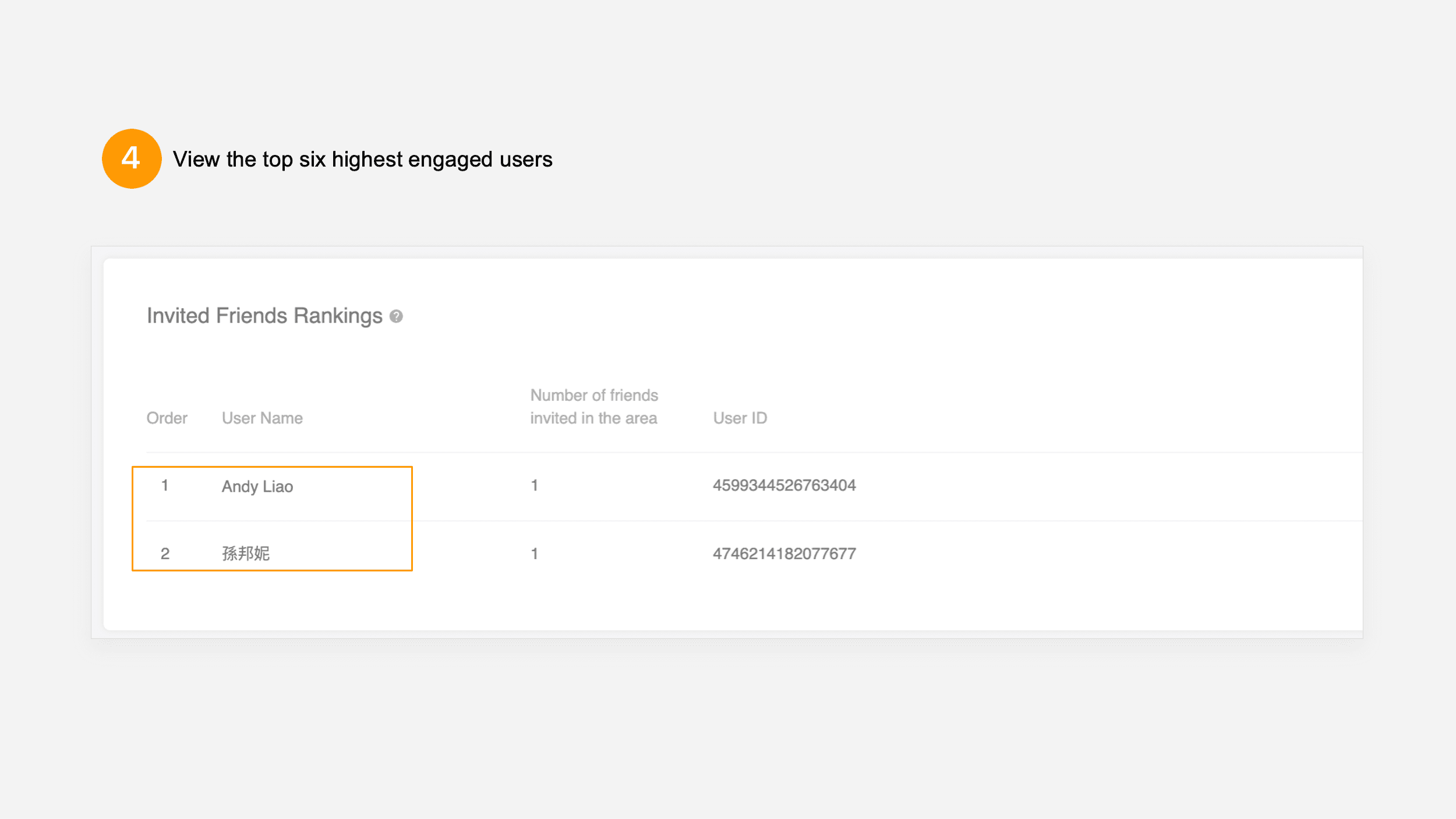
In addition, a very important piece of information is identifying highly engaged customers, which allows you to know which users have the highest degree of stickiness for this event. Therefore, Bonnie launched the “Invite Friends Rankings” to display the top six users with the highest number of friends invited.